
Walmart online shopping allows customers to browse, purchase, and receive products directly from Walmart.com using a computer, tablet, or smartphone. Instead of visiting a physical store, shoppers can explore millions of products online — including groceries, electronics, clothing, home essentials, beauty items, and more.
Walmart’s website and mobile app are designed to make shopping simple, fast, and secure. Customers can create an account, add items to their cart, choose delivery or pickup options, and complete payment within minutes.
Benefits of Ordering from Walmart.com
Ordering from Walmart online offers several advantages:

1. Convenience
- Shop anytime, 24/7
- No need to travel to a store
- Easy reordering of frequently purchased items
2. Huge Product Variety
- Millions of products across multiple categories
- Access to Walmart Marketplace sellers
- Detailed product descriptions and customer reviews
3. Flexible Delivery Options
- Home delivery
- Curbside pickup
- Same-day delivery (in select locations)
- Free shipping on eligible orders
4. Easy Returns
- Simple online return process
- Option to return items in-store
- Refund tracking through your account
How to Create a Walmart Account
Creating a Walmart account is quick and free. Follow these simple steps to get started:
Step 1: Visit Walmart.com

- Open your web browser.
- Go to www.walmart.com.
- You can also download and open the Walmart mobile app if you prefer shopping from your phone.
Step 2: Click “Account” → “Sign In” → “Create Account”
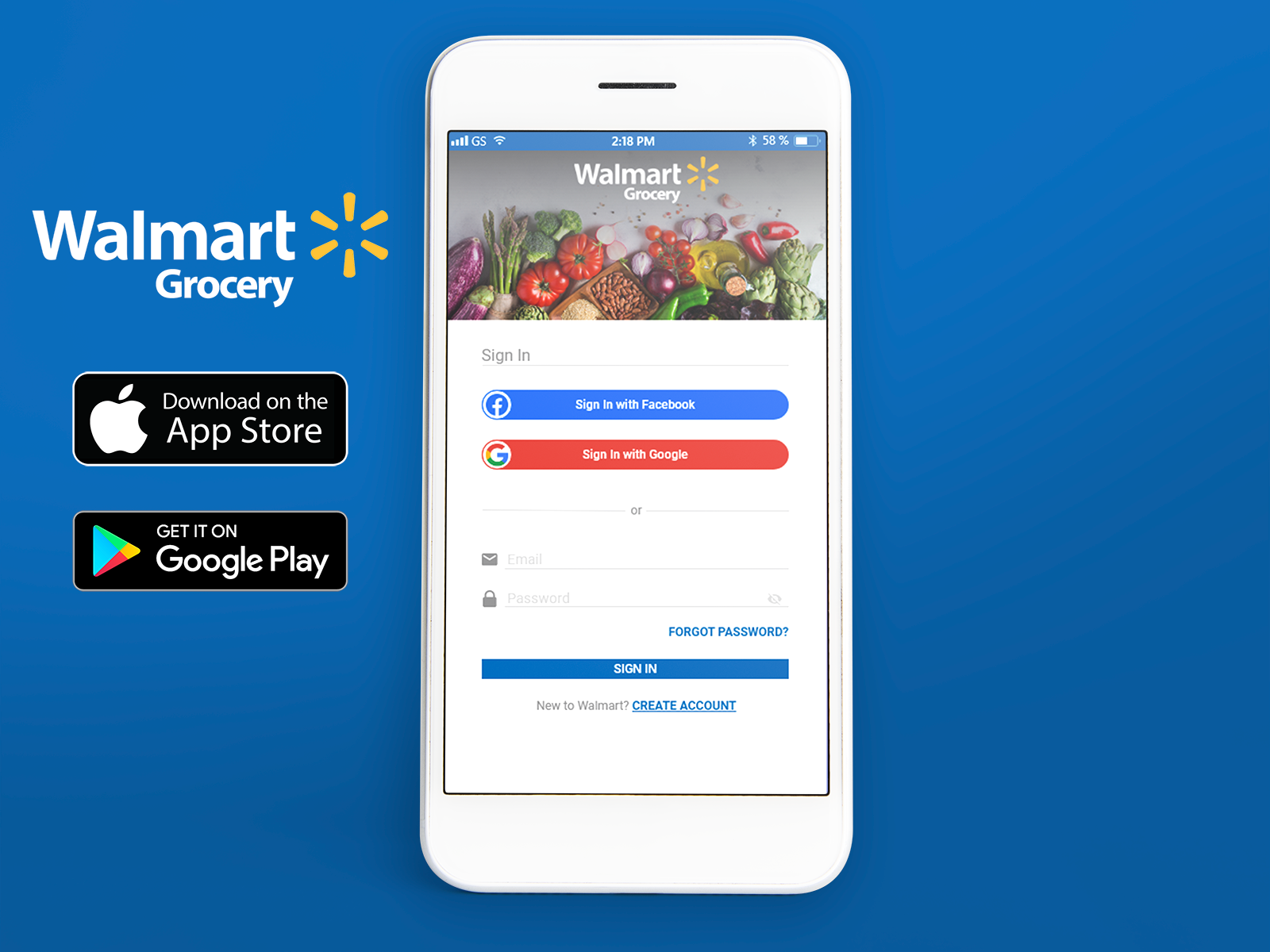

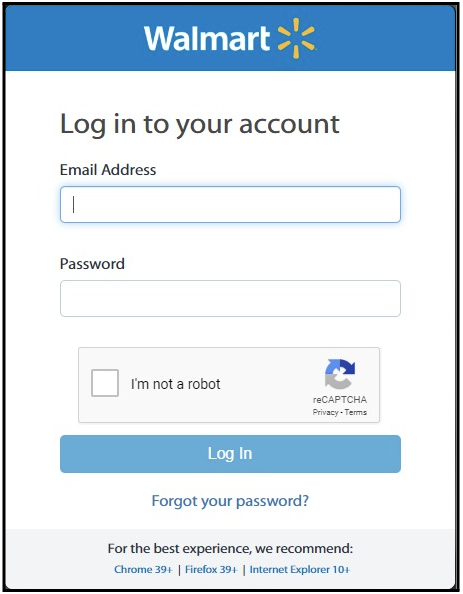
- Click on the Account icon (usually in the top-right corner).
- Select Sign In.
- On the login page, click Create Account.
This will take you to the registration page.
Step 3: Enter Personal Details
Fill in the required information:
- First and last name
- Email address
- Password (create a strong password)
- Mobile phone number (optional but recommended for order updates)
Make sure your email address is correct, as Walmart will send important notifications there.
Step 4: Verify Email (If Required)
- After submitting your details, Walmart may send a verification email.
- Open your email inbox.
- Click the verification link to confirm your account.
Once verified, your Walmart account is ready to use.
Benefits of Having a Walmart Account
Creating an account gives you access to several advantages:
✔ Faster checkout process
✔ Order tracking and history
✔ Easy returns and refunds
✔ Saved shipping addresses and payment methods
✔ Access to exclusive deals and promotions
✔ Ability to create wish lists
Having an account makes online shopping smoother, safer, and more convenient.
How to Search for Products on Walmart
Finding products on Walmart.com is simple. You can search directly, browse categories, or refine results using filters to quickly find exactly what you need.
Using the Search Bar
- Go to Walmart.com or open the Walmart app.
- Locate the search bar at the top of the page.
- Type the product name (e.g., “laptop,” “coffee maker,” “men’s shoes”).
- Press Enter or click the search icon.
Tip: Use specific keywords like brand names or model numbers to get more accurate results.
Browsing by Categories
If you’re not sure what exactly you want:
- Click on the Departments or Categories menu.
- Choose from options like Electronics, Grocery, Clothing, Home, Beauty, etc.
- Browse subcategories to narrow your selection.
This method is helpful when you want to explore deals or compare different products.
Using Filters (Price, Brand, Ratings, Availability)
After searching or selecting a category, you can refine your results using filters:
- Price Range – Set a minimum and maximum budget
- Brand – Choose specific brands
- Customer Ratings – Filter by 4 stars & above
- Availability – In stock, pickup today, or delivery options
- Shipping Speed – Same-day or next-day delivery
Using filters saves time and helps you find the best option quickly.
Reading Product Descriptions & Reviews
Before purchasing, always review product details:
- Product Description – Features, specifications, size, materials
- Images & Videos – View from different angles
- Customer Reviews – Real buyer experiences
- Ratings – Overall satisfaction score
Tip: Focus on reviews with photos and verified purchases for more reliable feedback.
How to Add Items to Your Cart
Once you’ve found the product you want, the next step is adding it to your cart. Follow these simple steps to make sure you select the correct item before checkout.
Selecting Size, Color, Quantity
On the product page:
- Choose the correct size (for clothing, shoes, etc.).
- Select your preferred color if multiple options are available.
- Adjust the quantity if you want more than one item.
Make sure your selections are correct before moving forward, especially for items with multiple variations.
Checking Stock Availability
Before adding the item:
- Check if the product is marked In Stock.
- Review delivery options such as shipping, pickup, or same-day delivery.
- Confirm availability for your location by entering your ZIP code (if required).
If an item is out of stock, Walmart may suggest similar products.
Clicking “Add to Cart”
After selecting all required options:
- Click the “Add to Cart” button.
- You’ll usually see a confirmation message that the item has been added successfully.
You can continue shopping or proceed directly to checkout.
Reviewing Cart Items
To review your items:
- Click the Cart icon at the top of the page.
- Check product details (size, color, quantity).
- Update quantity or remove items if needed.
- Review the subtotal before proceeding to checkout.
How to Apply Coupons or Promo Codes
Walmart allows customers to apply promo codes, gift cards, and discounts during checkout to save money. Here’s how you can use them properly.
Where to Enter Promo Codes
- Add your items to the cart and click Checkout.
- On the checkout page, look for a field labeled “Promo Code,” “Discount Code,” or “Gift Card.”
- Enter your valid promo code in the box.
- Click Apply to activate the discount.
If the code is valid, the discount will be reflected in your order total immediately.
Tip: Make sure the promo code hasn’t expired and applies to the items in your cart.
Using Walmart Gift Cards
You can also pay using a Walmart gift card:
- During checkout, select the Gift Card option under payment methods.
- Enter the gift card number and PIN (found on the back of the card).
- Click Apply to use the balance toward your purchase.
If your gift card balance doesn’t cover the full amount, you can pay the remaining balance using another payment method.
Checking for Ongoing Discounts
Before completing your order, look for additional savings:
- Check the product page for Rollback or Special Offer labels.
- Browse Walmart’s Deals section for current promotions.
- Look for bundle offers or bulk discounts.
- Sign up for Walmart emails to receive exclusive deals.
How to Choose Shipping or Pickup Options
After reviewing your cart and proceeding to checkout, Walmart will ask you to select how you’d like to receive your order. You can choose between delivery or pickup options based on your preference and location.
Home Delivery
Home delivery is the most common option.
- Select Shipping during checkout.
- Enter or confirm your delivery address.
- Choose from available shipping speeds (standard, next-day, etc.).
- Review any shipping fees (free shipping may apply to eligible orders).
Your items will be delivered directly to your home or chosen address.
Walmart Curbside Pickup
Curbside pickup allows you to collect your order from a nearby Walmart store without entering the store.
- Select Pickup at checkout.
- Choose a nearby Walmart location.
- Select a convenient pickup time slot.
- Wait for a confirmation email or notification that your order is ready.
When you arrive at the store, park in the designated pickup area and follow the instructions in your confirmation message.
Same-Day Delivery (If Available)
In some areas, Walmart offers same-day delivery.
- Select Same-Day Delivery if it appears as an option.
- Choose an available time window.
- Complete checkout before the cutoff time.
This option is ideal for urgent purchases like groceries or household essentials.
Estimated Delivery Time
Before finalizing your order, always check:
- The estimated delivery date shown at checkout.
- Whether items in your cart will arrive separately.
- Tracking availability after the order is confirmed.
How to Track Your Walmart Order
After placing your order, Walmart makes it easy to track your shipment and stay updated on delivery status.
Logging Into Your Account
- Visit Walmart.com or open the Walmart app.
- Click on Account and sign in.
- Go to Purchase History or Order History.
- Select the order you want to track.
You’ll see the current status, such as Processing, Shipped, Out for Delivery, or Delivered. If the item has shipped, you can click the tracking number for detailed carrier updates.
Tracking via Confirmation Email
After placing your order, Walmart sends a confirmation email.
- Open the email titled Order Confirmation or Your Order Has Shipped.
- Click the Track Order link inside the email.
This will redirect you to the tracking page where you can see real-time updates.
Delivery Updates
Walmart may send notifications about your order:
- Email updates when your order ships
- SMS updates (if you provided a phone number)
- App notifications for delivery progress
If your package is delayed, the tracking page will usually show the updated delivery estimate.
Walmart Return & Refund Policy
Walmart offers a straightforward return and refund process to ensure customers can shop with confidence. You can return items online or in-store, depending on your preference and the product type.
How to Return Items Online
- Log in to your Walmart account and go to Purchase History.
- Select the item you want to return.
- Click Start a Return and choose a return method (mail or store drop-off).
- Follow the instructions to print a return label if shipping by mail.
- Pack the item securely and send it back using the provided label.
Return Time Limits
- Most items can be returned within 90 days of purchase.
- Some products, like electronics or seasonal items, may have shorter return windows.
- Always check the specific item’s return policy on the product page.
Refund Process
- Once Walmart receives and inspects your returned item, a refund will be issued to your original payment method.
- Refunds typically take 3–10 business days to appear, depending on your bank or card issuer.
- You’ll receive an email confirmation once the refund is processed.
In-Store Returns
- Bring the item and original receipt or packing slip to any Walmart store.
- Go to the Customer Service desk or designated return counter.
- Present your ID if required.
- Choose between a refund, replacement, or store credit.
Following Walmart’s return and refund guidelines ensures a smooth and hassle-free process for returning any purchased item.
Common Problems & Solutions
While shopping on Walmart.com is usually smooth, you may encounter some issues. Here’s how to handle common problems effectively.
Payment Declined
Possible Reasons:
- Incorrect card details (number, expiration date, CVV)
- Insufficient funds
- Card not authorized for online transactions
Solutions:
- Double-check your card information and billing address
- Try another payment method (another card, PayPal, or gift card)
- Contact your bank if the issue persists
Item Out of Stock
Possible Reasons:
- High demand or limited supply
- Product temporarily unavailable at your location
Solutions:
- Check if the item is available at a nearby Walmart store for pickup
- Look for alternative sellers or similar products on Walmart Marketplace
- Set a notification for when the item is back in stock
Delayed Delivery
Possible Reasons:
- High order volume (holidays or sales)
- Carrier delays
- Weather or logistical issues
Solutions:
- Track your order through your Walmart account for real-time updates
- Contact Walmart customer service for assistance if delivery is significantly delayed
- Consider faster shipping options for urgent items
Contacting Walmart Customer Service
If problems persist, you can reach Walmart support:
- Online Help: Visit Walmart Help Center
- Phone: Call 1-800-WALMART (1-800-925-6278)
- Live Chat: Available through Walmart.com
- Social Media: Reach out via Walmart’s official Twitter or Facebook pages
Having the correct order details, like order number and email address, makes it faster for customer service to assist you.
Tips for Safe & Smart Shopping
Shopping on Walmart.com is convenient, but following a few smart practices can help you save money and avoid issues.
Compare Prices
- Check prices on Walmart against other online retailers to ensure you’re getting the best deal.
- Look for Rollback or Clearance labels on Walmart for discounted items.
- Consider buying in bulk if it reduces the cost per item.
Check Seller Ratings (Marketplace Sellers)
- Some products are sold by third-party sellers on Walmart Marketplace.
- Review seller ratings and customer feedback before purchasing.
- Choose sellers with high ratings and positive reviews to ensure reliable service.
Enable Order Notifications
- Opt in for email or SMS notifications to stay updated on shipping and delivery.
- Use the Walmart app to receive real-time alerts on order status.
- Notifications help you track packages and quickly resolve any issues.
Keep Receipts & Confirmation Emails
- Save your order confirmations and receipts for returns or refunds.
- Screenshots of online receipts can serve as proof of purchase if needed.
- Maintaining records ensures smooth processing in case of disputes or problems.
Following these tips will make your Walmart online shopping safer, faster, and more cost-effective.
Frequently Asked Questions (FAQ)
Here are answers to some common questions about shopping on Walmart.com:
Can I Order Without an Account?
Yes, Walmart allows guest checkout, so you can place an order without creating an account.
However, having an account makes it easier to track orders, save addresses, and access order history.
Does Walmart Offer International Shipping?
Walmart primarily ships within the United States.
For international orders, you may need to use a package forwarding service or check if specific items are available from Walmart Marketplace sellers that ship internationally.
How Long Does Delivery Take?
Delivery time depends on the shipping option you choose:
- Standard Shipping: 3–5 business days
- Two-Day Shipping: 2 business days for eligible items
- Same-Day Delivery: Available in select areas
You can check estimated delivery dates during checkout.
Can I Cancel My Order?
Yes, but only before the order is processed or shipped:
- Log in to your Walmart account and go to Order History.
- Select the order and click Cancel if the option is available.
- If the order has already shipped, you will need to return it after delivery.
These FAQs help clarify common concerns and make your Walmart online shopping experience smoother.